
What Is Norva? A Straightforward Guide to the Media Player
Norva is software that organises and plays media from a compatible source the user owns or is legally authorised to use across supported web, mobile, and TV devices.
In short: Norva is a software media player and organiser. You connect a compatible media source that you own or are legally authorised to use, then browse and play that source through a coherent experience on supported web, mobile, and TV devices. The subscription covers the software; it does not include a media catalogue or media access.
That boundary is the simplest way to evaluate Norva. It can improve how an existing authorised source is organised and used across screens, but it is not a replacement for the source itself.
A good fit starts with a source, not another app's password
Consider three situations:
| Your starting point | What to do before deciding |
|---|---|
| You own a media collection, or its owner authorises your access, and you have connection details in a format Norva accepts | Verify the source's rights and supported format, then test a small representative set on your intended device |
| You only have a username and password for a different viewing application | Ask the source owner whether it provides a compatible connection method that you are authorised to use; do not assume those app credentials can be entered into Norva |
| You expect a Norva subscription to unlock a supplied catalogue | Norva does not meet that expectation: its subscription covers the software, not media access |
These are illustrative situations, not verified customer setups. A password that signs in to another application's account is not, by itself, a compatible media source. Do not paste unrelated account credentials into a playlist field or attempt to extract another service's private media URLs.
The empty web source form below makes that boundary tangible: this is where compatible source information belongs, not where Norva sells or supplies a catalogue.
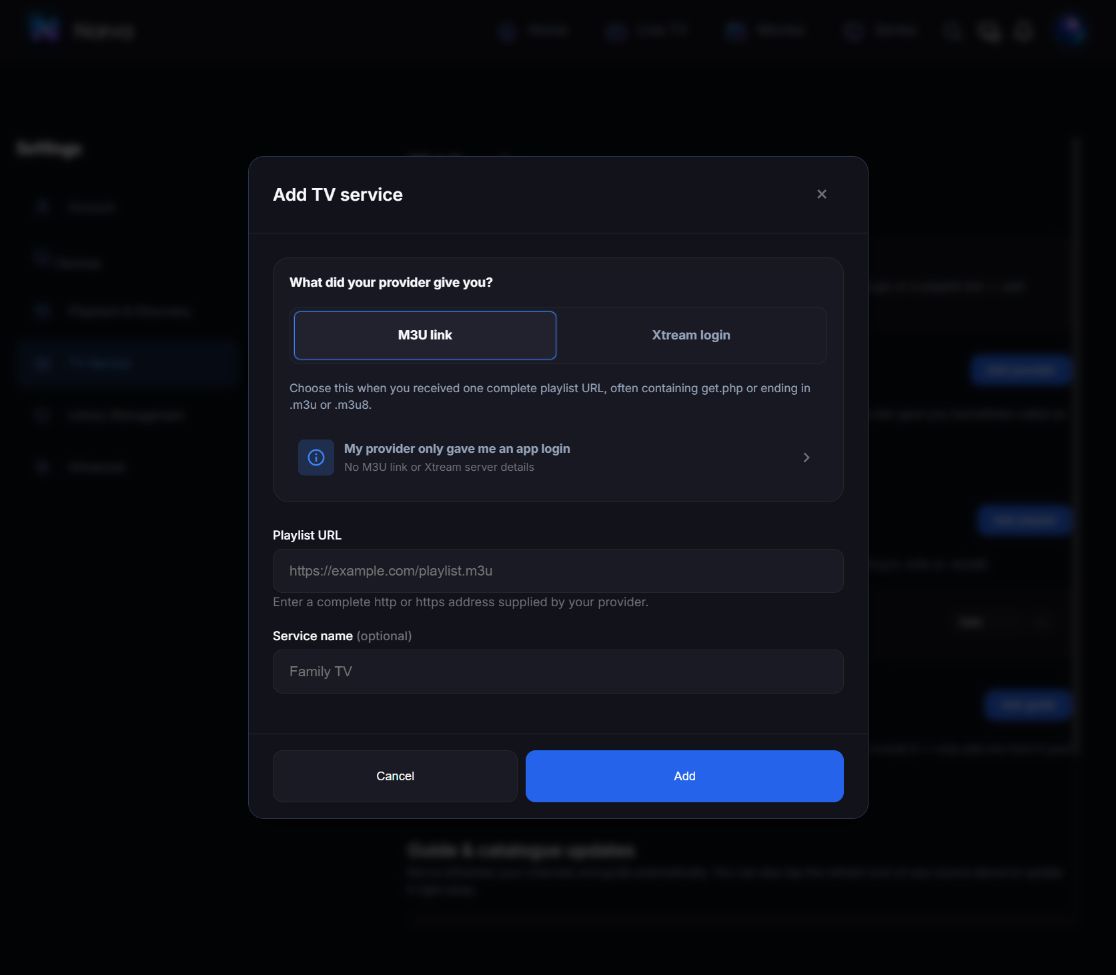
In this web form, M3U link is selected and Playlist URL expects a complete compatible source URL. The example address is placeholder text, not a working source. If all you were given is an app login, the visible “My provider only gave me an app login” help option addresses that situation before you try to add anything.
The capture comes directly from the signed-in web interface. A separate Xtream test later showed Ready in source settings; source-specific language filtering returned labelled cards, and search opened a known title with twelve versions. Those observations verify catalogue interactions on that test account, not successful playback or universal compatibility. The connection walkthrough records the tested steps and limits. Check your own authorised source on your intended device; another platform's interface may differ.
What Norva does
Norva is designed to organise the catalogue exposed by a connected compatible source. Its public feature information describes:
- catalogue organisation and search;
- grouping of media variants;
- favourites, history, and playback progress;
- source-based recommendations;
- audio and subtitle preferences when those options are available;
- supported web, mobile, and TV experiences;
- profile-based household organisation;
- conditional offline access on supported mobile workflows.
The same account can retain catalogue state, progress, history, favourites, and preferences across supported devices. Do not translate that into a promise of instant sync under every network condition.
What Norva does not provide
Norva's subscription does not include a catalogue or media access. The user still needs:
- a compatible media source;
- ownership or legal authorisation to use that source;
- the rights required for the intended media use;
- supported hardware and software;
- a suitable connection for setup, connected playback, and synchronisation;
- enough local storage when eligible offline access is used.
The player versus content-provider explanation separates these responsibilities in more detail.
How the device experiences differ
On the web, Norva runs in a compatible browser without installation. Mobile provides a touch-oriented experience and can support eligible offline access when the device, source, and associated rights permit it. TV provides navigation designed for a remote control.
The goal is continuity, not an identical layout on every screen. A remote, touch display, and browser have different interaction needs. When evaluating the product, test the real devices and input methods you expect to use.
How profiles work
The Norva plan includes up to two profiles. Norva Family includes up to five. Profiles help keep viewing progress, favourites, and preferences separated within the household.
These numbers describe profile capacity. They should not be presented as device or simultaneous-playback limits. Review the current plan details on the official pricing page before subscribing; the number of household profiles is only one part of your decision.
How offline access fits
Eligible offline items are encrypted and stored on the device and are not uploaded to Norva. Availability is conditional on the device, source, media, and associated rights.
Offline access should be tested before travel. A visible title or successful connected playback does not prove an offline copy is ready. The offline playback explainer covers eligibility, preparation, disconnected playback, and later reconciliation.
A practical evaluation sequence
Use one representative source and a small test set:
- verify that you own or are authorised to use the source;
- connect it through the current Norva setup route;
- inspect catalogue organisation and metadata;
- search for several known items;
- test one item with multiple versions if available;
- create a favourite and a playback checkpoint;
- check the same profile on another supported device;
- test remote navigation on TV;
- test language choices using items known to expose them;
- review plan and cancellation terms before deciding.
The Norva evaluation framework helps record what passed, what needs a recheck and what is not applicable to your setup. A successful sign-in alone is not a successful media test.
Complete your product-fit worksheet
| Requirement | You provide | Norva role | Verified? |
|---|---|---|---|
| Compatible authorised source | Yes | Connects and organises | |
| Media access and rights | Yes | Does not supply them | |
| Supported device | Yes | Provides web, mobile, or TV interface | |
| Cross-device state | Account and connectivity | Retains supported progress and preferences | |
| Household separation | Choose profile need | Up to 2 or 5 profiles by plan | |
| Offline eligibility | Device, source, media, rights | Manages eligible local items |
Complete the table using your own setup. It is a decision aid, not evidence that a particular source or device is compatible.
Common mistakes and limitations
- Assuming the subscription includes media.
- Connecting a source without confirming authorisation.
- Treating profile capacity as a device limit.
- Expecting every source feature or media track to exist.
- Assuming one interface should look identical on every screen.
- Promising immediate sync or universal offline access.
- Evaluating only artwork rather than complete workflows.
Compatibility, prices, terms, and feature availability should be rechecked against current official pages before publication or purchase.
Frequently asked questions
Does Norva include films, series, or channels?
No media catalogue or media access is included in the subscription. Norva organises a compatible source that the user owns or is legally authorised to use.
Where can I use Norva?
Norva is available on supported web, mobile, and TV experiences. The web version runs in a compatible browser without installation, and TV navigation is designed for a remote.
Can several household members have separate preferences?
Yes, through profiles. Norva includes up to two profiles and Norva Family up to five. Check current plan terms before deciding.
Your next step
Check what you need to connect your source before committing to a plan. If the source format or your authorisation is unclear, resolve that first; do not treat an active subscription as proof of compatibility.