
Resolution and Bitrate: Why They Are Not the Same
A controlled comparison of frame dimensions and data rate, including codec, source, scene complexity, motion, and delivery context.
In short: Resolution describes the width and height of each video frame in samples or pixels. Bitrate describes how much encoded data is used over time, commonly expressed as a rate. They are independent properties: two videos can have the same resolution and different bitrates, or different resolutions and similar bitrates. Neither value alone guarantees visible quality.
Resolution answers "how many spatial samples form the frame?" Bitrate answers "how much encoded data is allocated over time?" The codec, encoder settings, source, frame rate, motion, noise, and scene complexity determine how effectively that data represents the picture.
A worked example: two 1080p videos, different data rates
Imagine two video tracks with 1920 × 1080 pixels per frame. Both have 2,073,600 pixels in each frame. Give version A an average video bitrate of 4 Mbps and version B an average of 8 Mbps. The frame dimensions stay identical; the second track uses twice as many encoded video bits over the same duration.
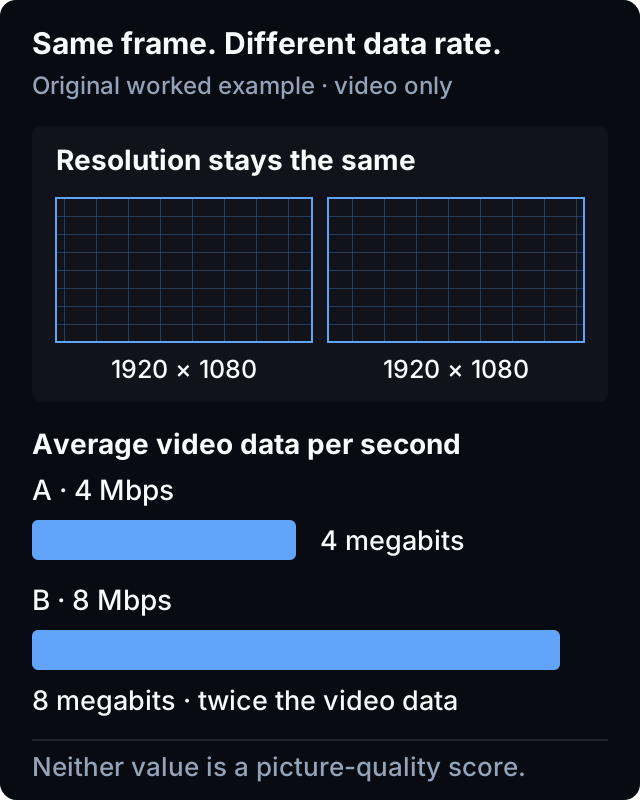
For ten minutes, the video-only arithmetic is:
| Assumed average video rate | Calculation for 600 seconds | Video data, decimal MB |
|---|---|---|
| 4 Mbps | 4 × 600 ÷ 8 | 300 MB |
| 8 Mbps | 8 × 600 ÷ 8 | 600 MB |
Here, Mbps means millions of bits per second; MB means millions of bytes, with eight bits per byte. These examples exclude audio, subtitles, container overhead, encryption and network overhead. A variable-rate track requires its average over the duration, not a peak value, for this calculation. The result is not a promise about a Norva download size or a connection-speed requirement.
What can you conclude? Version B carries twice as much video data in this example. You cannot conclude that it has twice the detail, looks twice as good, or will play smoothly on a particular device. Those questions require a picture and playback comparison.
Understand what resolution can tell you
Frame dimensions set a maximum spatial grid for the encoded picture. They do not reveal whether the source contained matching detail, whether it was previously compressed, or whether scaling and filtering softened it.
A larger frame made from a smaller or damaged source still carries the source limitation. The complete quality guide maps source, encode, delivery, decode, and display as separate layers.
Understand what bitrate can tell you
Bitrate indicates data over time, but the reported value may be target, average, peak, measured segment rate, or container-level information. Variable-rate encoding can allocate different amounts to different moments. Always record what the number represents and how it was obtained.
More data can give an encoder more room, but comparing bare bitrate across different codecs, profiles, sources, resolutions, frame rates, and encoder implementations is not a controlled quality test.
Include scene complexity
A quiet shot with clean backgrounds can be easier to represent than fast motion, fine texture, film grain, water, smoke, confetti, or rapid lighting changes. The same encode can therefore look strong in one scene and expose artifacts in another.
Describe what you see: square blocks, halos around edges, visible steps in a gradient, or fine detail that disappears in motion. These observations are more useful than saying the image is simply “not 1080p”; none identifies the cause on its own.
Include codec and encoder context
A codec specification defines a decoding format and tools; it does not make every encoder output equally effective. Encoder decisions, profile, bit depth, chroma format, keyframe structure, and other parameters can matter. Record only properties you can verify.
Do not claim one codec always looks better at a particular bitrate across all content.
Copy this comparison card for your own media
| Field | Version A | Version B | Controlled? |
|---|---|---|---|
| Source lineage | Known/unknown | Known/unknown | Yes/no |
| Dimensions | Verified value | Verified value | Yes/no |
| Bitrate type/value | Verified context | Verified context | Yes/no |
| Codec/profile/frame rate | Verified/unknown | Verified/unknown | Yes/no |
| Scene/timecode | Same | Same | Yes |
| Observed artifacts | Description | Description | N/A |
| Delivery/device/display | Context | Context | Yes/no |
If source lineage or encoder settings differ, describe the comparison as observational rather than proof of one variable.
Run a fair viewer comparison
Fix the device, output, display mode, seat, and scene. Confirm both versions use the intended playback state and have settled after any automatic quality change. Compare fine detail, edges, gradients, dark regions, and motion at the same timecodes.
Use more than one scene: a still face, moving fine detail and a dark gradient expose different issues. Write down exact timecodes so another person can repeat your observation. If the picture stops rather than merely looks soft, use the startup versus mid-playback buffering guide to describe that separate symptom.
Avoid misleading calculations
"Bits per pixel" style ratios can support technical analysis when dimensions, frame rate, bitrate definition, codec, and content are controlled, but they do not become a universal perceptual score. Averages can hide momentary stress and variable allocation.
Do not equate a media bitrate with your connection's usable capacity. Bandwidth, throughput, latency and jitter describe different aspects of delivery, including the difference between a stated capacity and data actually transferred.
Read interface labels cautiously
A resolution badge may describe an available representation or media property rather than the exact pixels currently reaching the display. A bitrate may not be exposed at all. Confirm current Norva badges and playback behavior through official product information instead of inventing a value.
Norva organises and plays compatible sources users own or are authorised to use; it should not be described as supplying a catalogue.
Report the difference
Include versions without credentials, verified dimensions, bitrate type and source, codec and frame rate when known, scene and timecode, device, delivery state, display path, and observed artifacts. Mark unknowns explicitly.
Frequently asked questions
Does higher resolution mean higher bitrate?
Not necessarily. They are independently chosen properties, although representing more spatial detail can change encoding demands.
Is a higher bitrate always visibly better?
Not across uncontrolled codecs, sources, settings, scenes, and devices. Compare matched contexts rather than one number.
Can two identical bitrates look different?
Yes. Resolution, codec, encoder decisions, source, frame rate, and scene complexity can differ.
Your next step
If a picture-quality problem remains, send the completed comparison card to Norva Support. Include the device, exact symptom and timecodes, but omit source credentials and private media URLs. Norva is a software player for a compatible source you own or are authorised to use; it does not supply the media catalogue.