
How to Organize a Large Movie Collection Without Endless Scrolling
Turn a long movie catalogue into predictable paths by organising for real viewing decisions rather than creating more labels.
In short: Organise a large movie collection around the decisions you actually make: what is available, what kind of film fits the moment, which version you want, and what you were already watching. Use a small number of stable categories, group true variants, hide unavailable entries when useful, and apply one or two filters at a time.
A large catalogue does not become manageable simply by adding more rows. The useful measure is retrieval: can you move from “I want something light from the 1990s” to a short, understandable set without inspecting hundreds of posters?
Start with four retrieval questions
Before changing categories, write down how you normally look for a movie:
- Availability: can I play this item from the compatible source I am authorised to use?
- Context: am I browsing by category, era, language, or another meaningful attribute?
- Version: are several entries really variants of the same title?
- Momentum: am I resuming, revisiting a favourite, or choosing something new?
These questions form a compact organising system. They also prevent one field—such as rating—from carrying more meaning than it should.
Build a shallow, stable hierarchy
Use broad categories that are likely to remain useful. A category should describe a meaningful browsing path, not a passing mood you will forget next week. Keep the main hierarchy shallow enough that every movie remains reachable without opening a chain of nested folders.
A practical pattern is:
- collection type at the top level;
- a modest set of categories beneath it;
- temporary refinement through filters and sorting;
- personal state through favourites, recent items, and Continue Watching.
For mixed libraries, keep films and episodic programmes distinct. The season and episode organisation guide explains why a series needs an episode hierarchy rather than movie-style grouping.
Reduce noise before adding labels
Organisation often improves fastest through subtraction:
- use an available-only view if your current interface provides one, while keeping unverified entries available for investigation;
- group genuine versions of the same title;
- investigate duplicates rather than creating a “duplicates” category;
- remove categories that contain almost everything or almost nothing.
Norva's public features describe catalogue organisation and grouped variants from a compatible source. The source remains responsible for the underlying catalogue and metadata. This guide's categories and cleanup actions are an organising method, not a claim that Norva exposes a button to rename, delete or group every source entry manually.
Use filters as temporary questions
Categories are persistent structure; filters are temporary questions. A year filter asks “from which period?” An audio or subtitle filter asks “which options are available?” A rating filter asks “which score range should I inspect?”
Begin broad, then add a second condition only if the result set is still unwieldy. For example:
- choose a meaningful category;
- narrow by a broad year range;
- confirm the language option you need;
- sort the remaining set for the decision at hand.
This approach is easier to reverse than building dozens of permanent micro-categories. The broad-to-narrow filtering workflow turns a viewing question into a small set of reversible refinements. Use only filters actually available for that source and screen; a missing field cannot be inferred from the poster.
Try it in Norva: source first, then language
In a live web check on 10 September 2026, we used a source already marked Ready, opened Movies → Filters, and selected its neutral nickname under Source. With All Categories retained, Audio language → Albanian returned cards showing that language badge. This is a reproducible navigation example, not a claim that Norva supplies those titles or that every matching file was played.
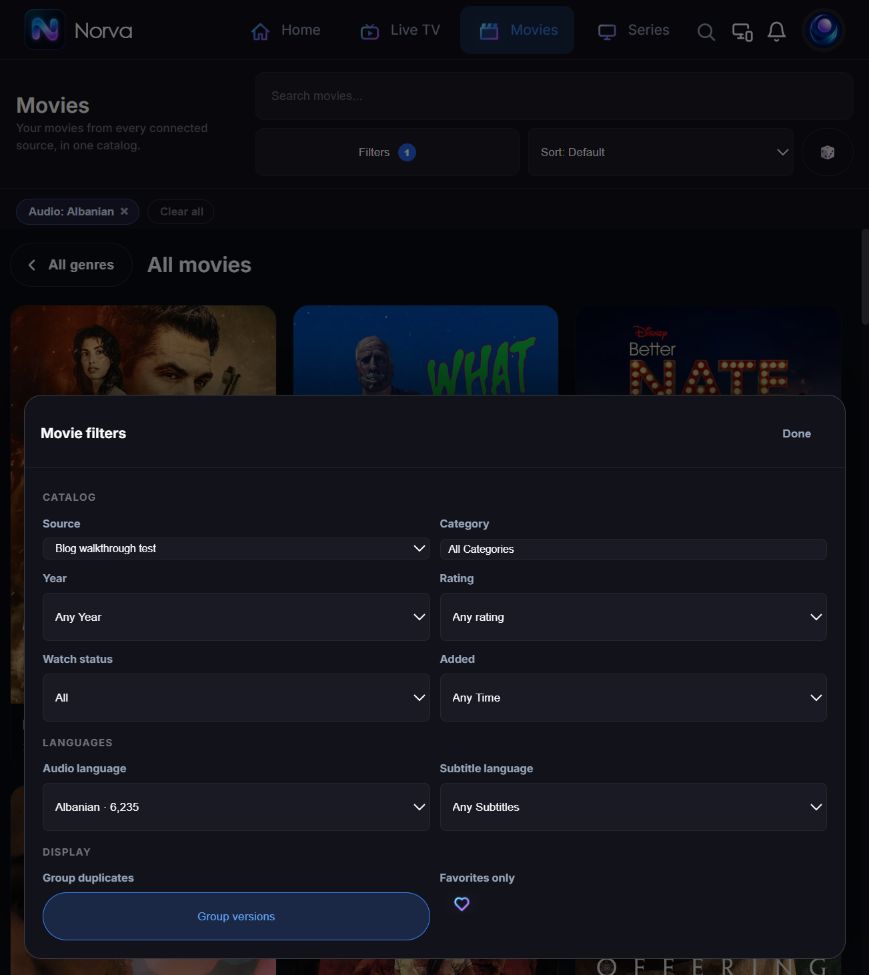
To repeat the method with your own compatible, authorised source:
- Open Movies, then Filters.
- Choose the source you want to inspect; keep All Categories initially.
- Select one useful Audio language. Leave Subtitle language at Any Subtitles unless you need that extra condition.
- Inspect the returned cards and open a relevant version. Recognised source labels and detected tracks support the language filter, but the filter alone is not a playback test.
- Remove the active audio chip or use Clear all before trying a different viewing question. Recheck Source if you want to browse a different catalogue.
This leaves the underlying source unchanged. If too few results remain, undo a filter before assuming the source has lost titles. The Group versions control is visible in the capture; the example does not claim that changing it rewrites or merges the source owner's files.
Keep incomplete metadata out of your conclusions
A source category describing a country or collection is not automatically a film genre. A regional language label such as Nordic languages does not establish a specific audio track. If you see Other or Language unidentified, inspect the available version information and the import state before drawing conclusions. Do not delete the item, invent a language or repeatedly reconnect the source to make a filter look complete. The source-connection walkthrough separates catalogue, metadata and playback checks.
Group versions, not merely similar titles
Two items should be grouped when they represent meaningful versions of the same work—for example, variants supplied by the source with different technical or language attributes. Similar titles, remakes, sequels, and films sharing a name may need to remain separate.
Grouping improves browsing only when the group has a clear representative and the versions remain understandable. Before any broader change, use the catalogue cleanup plan to record the original state and the reason for the change.
Worked example: five entries, four different decisions
The following records are fictional, written to demonstrate the method. They are not a Norva screenshot, an imported source or a customer's collection. In this example only, the source owner has confirmed that the first two records are versions of the same work. Matching title text alone would not establish that.
| Example record | What is known | Decision | Check before considering it finished |
|---|---|---|---|
| Film A, 1994, version 1 | Owner identifies work A-1994; English audio listed | Keep with the other verified version of A-1994 | Both version choices remain identifiable |
| Film A, 1994, version 2 | Same verified work; French audio listed | Treat as a version, not a second film | Confirm the language in actual playback |
| Film A, 2021 | Owner identifies a different work, A-2021 | Keep separate despite the matching name | Year and other verified metadata distinguish it |
| Film B, 2007 | Duration is missing | Retain it and mark the duration unknown in the review notes | Verify duration from an authorised source; do not guess |
| Film C, 1998 | Current availability has not been checked | Keep it pending a playback check | Record the result; do not delete on an assumption |
Notice what the exercise does not do: it does not invent a category for every exception, delete a record because a field is blank, or merge two different films because their names match. After identifying the first pair, there are four distinct works in these five fictional entries. That count is arithmetic from the example, not a claim about automatic deduplication or space saved.
To try the method on your own authorised collection, choose a small sample and write down the record identifiers privately. Verify one ambiguous pair, one missing field and one availability question before changing anything broadly. Where the player does not expose the required edit, keep a review note or use the source owner's supported correction route. Do not substitute an unverified manual change for a missing control.
A short library triage worksheet
Use this worksheet periodically or whenever the catalogue changes:
| Question | Action | Finished when |
|---|---|---|
| What cannot currently be used? | Review availability | The default view matches the browsing goal |
| What appears more than once? | Group variants or diagnose duplicates | Each group has a clear reason |
| Which categories do not help? | Merge, rename, or remove them | Every remaining category has a purpose |
| Which view should open first? | Choose all, recent, favourites, or resume | The first screen supports the usual task |
Apply each action only where your source or current interface supports it. Record before-and-after values and keep a reversible path for any edit. This is a reproducible process, not a timed result or a claim that one taxonomy works for every collection. Run it on a small sample first. If a change makes ten representative titles harder to find, revise the rule before applying it widely.
Keep the system maintainable
A good system should survive new additions without constant redesign. Reserve occasional maintenance for:
- resolving new duplicates;
- checking unavailable items;
- reviewing oversized categories;
- confirming that grouped versions still make sense;
- removing abandoned favourites or stale resume entries.
Avoid renaming everything during each review. Stable labels build familiarity, especially on a TV where long navigation paths create more remote-control steps.
Frequently asked questions
How many categories should a large movie collection have?
There is no universal number. Use the smallest set that creates distinct browsing paths for your own collection. If two categories repeatedly return the same titles and support the same decision, consider merging them.
Should every movie belong to several categories?
Only when those categories create genuinely different retrieval paths. Assigning many labels to every title increases overlap and can make browsing less predictable.
Is search enough for a large collection?
Search is efficient when you know part of a title, person, or other indexed detail. Categories, filters, favourites, and recent views are more helpful when you are exploring rather than retrieving a known item.
Your next step
Take one viewing question from your own collection and try the broad-to-narrow filtering workflow. Keep the original view recoverable and stop when the remaining choices are understandable. Norva supplies the software experience; you still need a compatible media source you own or are authorised to use.