
Captions and Subtitles: Why the Accessibility Goals Can Differ
A functional comparison of captions and subtitles based on speech, speaker, sound, music, translation, timing, and real cue coverage.
In short: Captions are generally intended to provide text access to speech and relevant audio information, which can include speaker identification, sound effects, and music. Subtitles may focus on dialogue, often for translation or transcription. Real resources and labels vary, so inspect cue coverage instead of assuming the word in the selector guarantees the role.
Both can use timed text and both can help many viewers. The difference is most useful when expressed as an information goal, not a rigid technology boundary.
Review the selected media rather than a generic catalogue label. One version may offer a caption resource and another only dialogue subtitles; an episode may differ from its neighbours. Record item, version, state, and exact track text beside every conclusion.
One scene, two different amounts of information
Here is a scene written for this article: Maya is off screen. She says “Wait here.” After she stops speaking, someone knocks on the door. The knock explains why the person on screen turns around.
A dialogue-only resource could show “Wait here.” A resource intended to convey the relevant audio could identify Maya and then add “[door knocks]” when the sound occurs. Without that second cue, a viewer who cannot rely on sound may miss the reason for the movement.
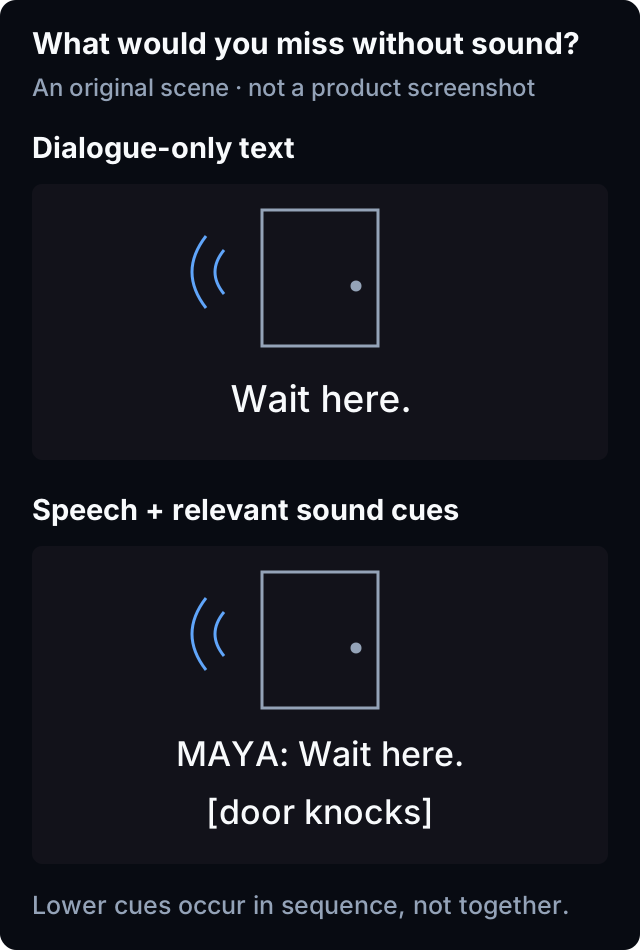
| Information in this example | Dialogue-only text | Speech plus relevant sound cues |
|---|---|---|
| The instruction | Wait here. | Wait here. |
| Who speaks off screen | Not identified | Maya identified |
| Why the person turns | No sound cue | Door knock described |
The lesson is about information, not a required punctuation style. A speaker need not be named if the picture already makes the speaker clear. A resource need not describe every incidental sound; prioritise sounds needed to understand the scene. W3C's captions and subtitles guidance explains this audio-information purpose and the variation in terminology.
Compare the intended information
Caption goals can include:
- spoken dialogue;
- off-screen or unclear speaker identification;
- meaningful non-speech sounds;
- music or lyrics when relevant;
- timing that supports following the programme without relying on audio.
Subtitle goals may prioritise rendering dialogue in the same or another language. Some subtitle resources include sound information; some caption resources may be incomplete. Verify the actual item.
Avoid label-only decisions
Labels such as “CC,” “SDH,” “captions,” or a language plus role can provide useful evidence. A broad language label does not establish caption coverage.
Record exact text and do not expand unfamiliar abbreviations without official evidence.
Use five representative scenes
Choose scenes containing:
- ordinary dialogue;
- an off-screen or visually ambiguous speaker;
- a meaningful sound without speech;
- music or lyrics that affect understanding;
- dialogue in another language or a significant sign.
Sample both candidates on the same scenes.
Copy this coverage card for your own tracks
| Scene | Caption candidate | Subtitle candidate | Viewer needs this information? |
|---|---|---|---|
| Dialogue | Cue result | Cue result | Yes/no |
| Speaker identity | Result | Result | Yes/no |
| Meaningful sound | Result | Result | Yes/no |
| Music/lyrics | Result | Result | Yes/no |
| Foreign passage/sign | Result | Result | Yes/no |
Use “not tested” when a scene type is unavailable.
Ask which outcome matters
A viewer who understands the spoken language but cannot rely on audio may need captions. A viewer who hears the soundtrack but does not understand the dialogue language may need translation subtitles. Some viewers need both language translation and non-speech information.
Do not infer the need from viewing history or require a medical explanation.
Understand limited subtitle roles
A signs-and-songs track may cover visible writing and lyrics but omit dialogue and sound effects. A forced track may cover selected passages. Neither should be treated as a complete caption substitute without cue evidence.
Also distinguish track role from delivery: a separate subtitle file and a track packaged with the media can each contain different kinds of cues. The built-in and separate tracks guide explains that independent distinction.
Connect role to readability
Correct content can still be inaccessible when text is too small, low-contrast, mistimed, or obscures essential visuals. The complete caption accessibility guide covers presentation and controls.
Track role and player styling are separate layers; document each separately.
Report misleading roles
When a label claims captions but samples omit the expected type of audio information, record exact label, five-scene results, item/version, state, device, steps, expected outcome, and observed result.
Include that record in a Norva Support report, but leave out source credentials and private media URLs. Avoid prescribing an exact replacement label when the source naming convention is unknown.
Common mistakes and limitations
Avoid saying captions and subtitles are always technically different, treating every same-language track as captions, and judging complete coverage from dialogue alone.
The source supplies the resource and metadata. Do not assume that selecting a caption-labelled track adds missing speaker or sound cues. In Norva, available languages and subtitles depend on the source and media; this article does not promise automatic caption generation or a particular styling control. Norva is a software player, not a media catalogue: use a compatible source you own or are authorised to use.
Frequently asked questions
Can subtitles include sound effects?
Yes, some resources do. Evaluate actual cue content rather than relying solely on terminology.
Are captions useful only when audio cannot be heard?
No. They can support many contexts, but the viewer should define the needed outcome.
What if no caption-labelled track exists?
Inspect available candidates for actual coverage, but do not promise that a subtitle track meets full caption needs.
Your next step
Choose and check an available subtitle track, then use the same scene to verify the language and information you need. If no available track supplies the missing cues, record that limitation instead of treating a language label as a solution.